TRapp: una aplicació per fer el seguiment dels treballs de recerca d’un centre

Avui us presento una aplicació que vaig col·laborar a crear en un inici. Ara fa un temps que no he pogut continuar donant un cop de mà, però he seguit la iniciativa de prop i crec que és interessant donar-la a conèixer, ja que pot ser útil per a molts centres de secundària de Catalunya.

És una aplicació que ajuda a fer tot el seguiment dels treballs de recerca d’un centre (alumnes, tutors, evidències, avaluació, informes, etc.).

Divideix el procés de realització del treball de recerca en sis etapes. En cada etapa, l’alumnat aprèn algun aspecte important per fer recerca i lliura una evidència d’aquest aprenentatge. El tutor i altres docents correctors, si es defineixen, van avaluant aquestes evidències, donant feed-back per tal que l’alumne les pugui millorar.

Al final del procés, l’aplicació fa també els informes finals.

Continue reading «TRapp: una aplicació per fer el seguiment dels treballs de recerca d’un centre»
Google Drive: Share folders or documents?

The idea is very simple. Director, for example, creates a folder structure and assigns permissions to each folder (starting from the top folder, as permissions are inherited from the top folder). An example would be:

  • Course 2013-2014
    • Groups
    • Timtables
    • RED (reuniones de equipos docentes)
      • 1r ESO
      • 2n ESO
      • 3r ESO
      • 4t ESO
    • Guardias
    • Creditos de síntesis
      • 1r ESO
      • 2n ESO
      • 3r ESO
    •  …

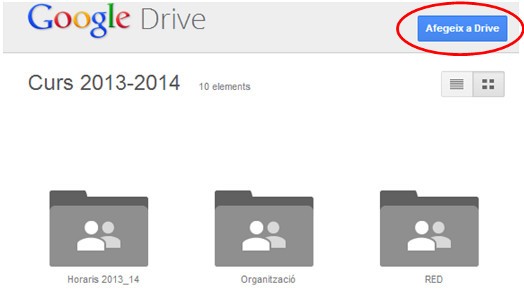
The folder to be shared is Course 2013-2014 and, if the permissions have been assigned, the other folders will be automatically accessible. If the Classes 2013-2014 folder is shared with all teachers, better through a group (Sharing documents and calendar with Google groups), everyone will receive an email with the link. When you open the folder, they will see its contents and a button that allows you to add this folder to your drive, to have it always located easily.

gdrive1

It will no longer be necessary to share the documents individually. By placing them in the corresponding folder, everyone will have immediate and organized access.

When a document is hung up, no mail is sent. If you want to notify, you will have to use the Send an email to the collaborators option, which is located inside the More button (if the document has been selected).

gdrive2

In the same way, you can create folders for Departments, Student Groups, etc.

In addition, if a new teacher joins the centre, you just need to provide him/her with the link to the initial folder and he/she will automatically have all the previous documents sorted in perfect order.

I think it’s a simple way for everyone to keep their documents in order.